
Home >> Our Blogs >>Google Search Console vs Google Analytics 4: The Ultimate Comparison Guide
Introduction
If you are managing a website, driving organic growth, or running digital marketing campaigns, you have likely encountered two of Google’s most essential tools: Google Search Console (GSC) and Google Analytics 4 (GA4). At first glance, both platforms provide dashboards full of traffic graphs, keywords, and landing pages. However, treat them as interchangeable, and you risk making critical business decisions based on misunderstood data.
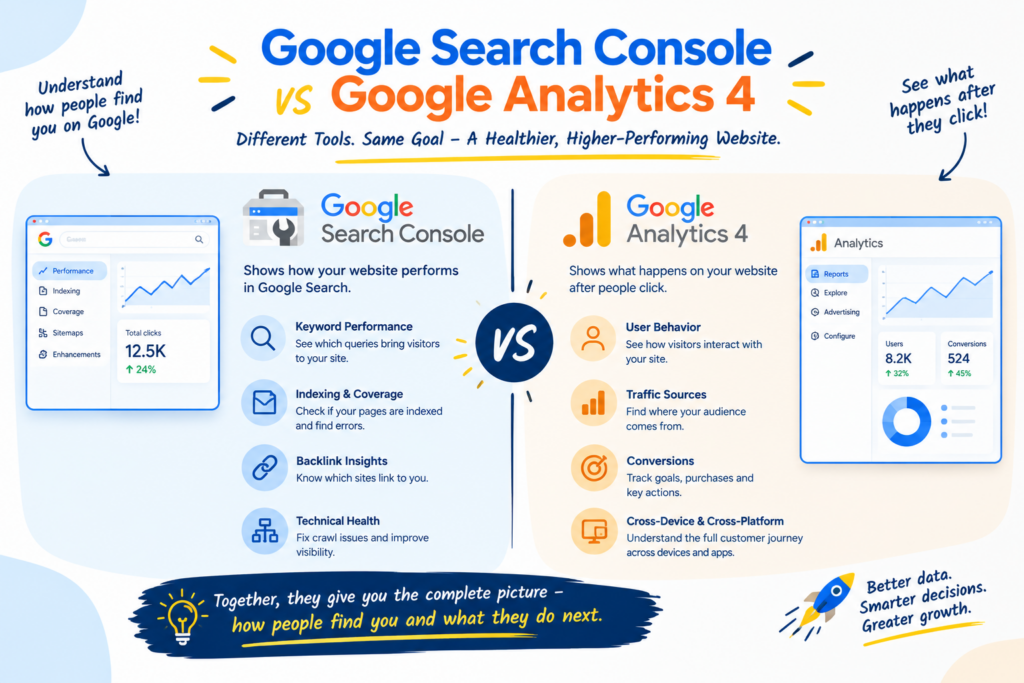
At ARP Softtech, we frequently work with business owners and marketing teams who ask: “Which tool should I focus on? Why don't my GSC clicks match my GA4 organic sessions?” The short answer is: Google Search Console measures what happens BEFORE a user visits your website, while Google Analytics 4 measures what happens AFTER they arrive.
In this complete comparison guide, we will break down the core functional differences, explain the notorious data discrepancy gap, present a side-by-side metric chart, and show you how to integrate both tools to maximize your organic growth. (If you are looking to scale your online visibility, explore our tailored SEO Services to start outranking your competitors today.)
💡 KEY TAKEAWAY: GSC tracks visibility in search engine results (Pre-Click), whereas GA4 tracks user interaction and conversions on your platform (Post-Click). You do not choose between them; you integrate them. |
What is Google Search Console (GSC)?
Google Search Console is a free webmaster tool provided by Google that serves as your direct communications channel with Google Search Engine. GSC focuses exclusively on your website's search performance, technical indexing health, and SERP (Search Engine Results Page) visibility.
Core Features & Capabilities of GSC:
- Keyword & Query Analysis: Discover the exact search queries, long-tail terms, and questions users type into Google that bring up your website pages.
- Indexation & Crawl Health: Identify which pages are indexed, request indexing for new content, and fix errors like 404s, canonical tags, or robots.txt blockages.
- Click-Through Rate (CTR) & Positions: Track organic impressions, actual search clicks, and your average ranking position across desktop and mobile devices.
Technical SEO & Core Web Vitals: Monitor page speed metrics, mobile usability, HTTPS security status, and structured data (schema markup) validation
Why It Matters More Than Ever
Links remain one of the signals search engines use to judge which pages deserve to rank, and in competitive markets they are often what separates the top results from the rest. But the picture has widened. AI-generated answers and conversational search tools draw on what the web collectively says about a brand, so being mentioned consistently by credible sources can support visibility even when nobody clicks through.
This changes the goal. The aim is no longer to collect as many links as possible. It is to become a business that other credible sites and real people have good reasons to mention.
What is Google Analytics 4 (GA4)?
Google Analytics 4 is an event-based analytics platform designed to track user behavior across your entire digital ecosystem—including organic search, paid ads, social media, email campaigns, and referral traffic.
Unlike legacy Universal Analytics (UA), GA4 operates on a flexible event-driven data model. Every interaction—a page view, video play, button click, file download, or purchase—is logged as an event. Learn how our comprehensive Digital Marketing Solutions leverage GA4 event tracking to turn web traffic into qualified sales leads.
Core Features & Capabilities of GA4:
- Multi-Channel Attribution: Measure traffic quality from organic search, Google Ads, Meta campaigns, email newsletters, and direct links in one unified platform.
- User Behavior & Engagement: Analyze engaged sessions, scroll depth, session duration, and overall conversion paths.
- Event & E-commerce Tracking: Track custom macro and micro-conversions (e.g., form submissions, cart additions, downloads, and completed purchases).
- Audience Segmentation: Build custom remarketing audiences and analyze demographic, geographic, and device-based user traits.
Why Don't GSC Clicks Match GA4 Organic Sessions?
One of the most frequent support tickets in SEO analytics is: “GSC reports 1,200 organic clicks, but GA4 only shows 850 organic sessions for the same period. Why is there a 30% gap?” This variance is completely normal and stems from fundamental differences in how each platform collects data:
- Click vs. Session Definitions: A 'Click' in GSC is recorded the millisecond a searcher clicks your link on Google's SERP. A 'Session' in GA4 is recorded only after your web page loads, the GA4 JavaScript tracking snippet executes, and a session start event is triggered. If a user bounces before loading finishes, GSC logs 1 click while GA4 logs 0 sessions.
- Cookie Consent & Script Blockers: Users who decline cookie tracking banners or use browser ad-blockers (e.g., Brave, Firefox Strict, Safari ITP) block GA4 tags from firing. GSC, recorded at Google's server level, captures these clicks accurately regardless of client-side blockers.
- Non-Google Organic Search Traffic: GA4 aggregates organic traffic from ALL search engines (Bing, DuckDuckGo, Yahoo, Ecosia, Baidu). GSC ONLY logs clicks originating from Google Search.
- Canonical URLs vs. URL Parameters: GSC consolidates all report metrics into canonical URLs. GA4 reports on exact landing page URLs, including tracking parameters (e.g., ?utm_source or ?ref=social), splitting metric counts across individual URL variations.
- Timezone & Attribution Windows: GSC records data in Pacific Time (PST/PDT) by default, whereas GA4 properties can be configured to any local business timezone. This creates apparent daily traffic discrepancies.
Head-to-Head Comparison: GSC vs. GA4
To help you quickly grasp how these tools differ in practice, the comparison table below outlines their primary functions, scope, and technical metrics:
Feature / Metric | Google Search Console (GSC) | Google Analytics 4 (GA4) |
Primary Focus | Search visibility & SERP performance | User behavior, channels & conversions |
Journey Stage | Pre-Click (On Google Search) | Post-Click (On your website) |
Data Scope | Google Search only (Organic) | All channels (Search, Paid, Social, Direct) |
Primary Metrics | Impressions, Clicks, CTR, Avg Position | Users, Sessions, Event Count, Key Events |
Technical Tracking | Server-level / Google Search Logs | Client-side JavaScript Tag (gtag.js) |
Key Technical Function | Page Indexing, Sitemaps, Schema | Conversion Funnels, Pathing, Revenue |
Real-Time Reporting | No (24–48 hour data lag) | Yes (Realtime Dashboard & DebugView) |
Query Visibility | Shows organic keywords searched | Hides search queries (Not Provided)* |
Core Web Vitals / Speed | Yes (Field data from Chrome UX) | No (Requires custom event logging) |
* Note: GSC keyword data can be imported into GA4 by linking the two properties.
How to Use GSC and GA4 Together for SEO Success
Rather than treating GSC and GA4 as competitors, top-performing digital marketers combine both tools into a unified growth workflow. If your website design or page loading speed is preventing visitors from converting, consult our specialized Web Development Services to optimize your site performance.
Step 1: Link GSC and GA4 Properties
Navigate to GA4 Admin > Property Settings > Product Links > Search Console Links. Connecting your accounts unlocks two dedicated reports in GA4: Google Organic Search Queries and Google Organic Search Traffic.
Step 2: Identify High-Impression, Low-CTR Opportunities (GSC)
Filter GSC Performance reports for keywords with high impressions but low CTR (<2%). Improve meta titles, write engaging meta descriptions, and implement schema markup to capture more clicks from existing rankings.
Step 3: Analyze Post-Click Engagement & Intent (GA4)
Cross-reference high-traffic landing pages in GA4. If a page has high organic clicks in GSC but an engagement rate under 40% or high drop-off in GA4, the content fails to fulfill user intent. Update the page layout, add clear calls-to-action (CTAs), and enhance content depth
Decision Framework: When to Use Which Tool
Use this quick guide when determining where to turn for specific marketing questions:
- Question: Are my new blog posts indexed by Google?
→ Best Tool: Google Search Console (URL Inspection Tool) - Question: Which search queries drive the most organic traffic?
→ Best Tool: Google Search Console (Performance Report) - Question: What is my organic conversion rate and e-commerce revenue?
→ Best Tool: Google Analytics 4 (Monetization & Conversion Reports) - Question: Why did my site traffic drop overall across all channels?
→ Best Tool: Google Analytics 4 (Acquisition Overview) - Question: Are mobile users experiencing page speed issues?
→ Best Tool: Google Search Console (Core Web Vitals & Page Experience)
Conclusion: Elevate Your SEO Strategy with ARP SOFTTECH
Understanding the distinct roles of Google Search Console and Google Analytics 4 is fundamental to building a successful digital marketing strategy. GSC empowers you to optimize your search visibility and technical foundation, while GA4 enables you to optimize user experience and conversion funnels.
By linking both platforms and analyzing pre-click and post-click metrics together, you gain total clarity over your customer growth cycle.
Ready to transform your SEO and web analytics into predictable revenue? Reach out to the digital growth experts at ARP Softtech today for a customized SEO audit and strategy session.